
Loading...
Loading...
Loading...
Loading...
Loading...
Loading...
Loading...
Loading...
Loading...
Loading...
Loading...
Loading...
Loading...
Loading...
Loading...
Loading...
Loading...
Loading...
Loading...
Loading...
Loading...
Loading...
Loading...
Loading...
Loading...
Loading...
Loading...
Loading...
Loading...
Loading...
Loading...
Loading...
Loading...
Loading...
Loading...
Loading...
Loading...
Loading...
Loading...
Loading...
Loading...
Loading...
Loading...
Loading...
Loading...
Loading...
Loading...
Loading...
Loading...
Loading...
Loading...
Loading...
Loading...
Loading...
Loading...
GraphQL is a query language for APIs that provides a powerful and flexible way for clients to request exactly the data they need from a server. Unlike traditional REST APIs that return predefined data structures, GraphQL allows you to specify the specific fields you want within a resource, eliminating the need for over-fetching or under-fetching of data. This approach leads to more efficient data transfer and reduces complexity on both the client and server sides.
GraphQL revolutionizes API interactions by letting you request exactly the data you need. Forget fetching everything and sifting through irrelevant details. Write precise queries specifying only the desired fields within a resource, and GraphQL delivers just that. This targeted approach streamlines data exchange, boosts performance, and simplifies development – like ordering a custom pizza, not the whole menu.
The key takeaway for GraphQL can be summarized as ask for what you need and get exactly that .
For more information about GraphQL visit https://graphql.org/
Authenticating to the GraphQL API
REST APIs has numerous endpoints; the GraphQL API has a single endpoint:
The endpoint remains constant no matter what operation you perform.
Because GraphQL operations consist of multiline JSON, we recommend using the to make GraphQL calls.
You can also use curl or any other HTTP-speaking library.
In REST, HTTP verbs determine the operation performed. In GraphQL, you'll provide a
Read our documentation and get up to speed on how to access our API capabilities.
Everything related to our system's infrastructure and what the API is built upon, please refer to the page below:
POSTGETTo query GraphQL in a curl command, make a POST request with a JSON payload. The payload must contain a string called query:
https://api.inabit.com/graphqlcurl -H "Authorization: bearer TOKEN" -X POST -d " \
{ \
\"query\": \"query { viewer { login }}\" \
} \
" https://api.github.com/graphqlLet's get you up and running!
The inabit GraphQL API allows you to interact programmatically with inabit's platform, for a variety of use cases:
Manage your inabit account, organizations & users.
Manage wallets (both inabit & external wallets).
Automate transaction flows.
And many other use cases you might think of that can help your business automate its workflow.
Receive a JWT access token for your inabit account's API Admin user by contacting our support team at [email protected].
To make your first request, send an authenticated request using the access token. Remember to authorize using the token across all of your future queries and mutations.
Easily access our GraphQL API using a premade Postman collection made for your comfort
Used to REST? Feeling more comfortable using Postman? No problem! Our team created a custom postman collection which includes all of the API queries & mutations listed in our API Reference.
Simply download the JSON file and import it to the Postman application in your desktop.
There should be an "Import" () button next to the collections tab on the top left hand side in the application.
Navigating inabit Data: A Look at the GraphQL Schema
At the heart of any GraphQL API lies the schema, a technical blueprint that serves as your guide to interacting with the data. Imagine a complex database – the schema acts as its detailed map, outlining the available data structures and their relationships.
This schema serves several key purposes for developers:
Understanding Data Structure: It meticulously defines the data types (like users, products, or posts) available within the API. Each type has its own set of properties (fields), essentially representing the specific attributes you can access. This transparency allows you to pinpoint the exact data you need for your application.
Crafting Precise Queries: With a clear understanding of the data structure, you can construct targeted queries to retrieve specific information. Forget fetching everything and sifting through irrelevant details. Instead, you can write queries that request only the desired fields within a particular data type, optimizing data transfer and improving application performance.
Learn what are mutations in GraphQL and how they can be used
Access Token API calls will be denied.Executing Mutations (Optional): Beyond data retrieval, some GraphQL APIs allow for data manipulation through mutations. The schema plays a crucial role here as well, outlining the types and their connections. By understanding these relationships, you can craft mutations to create new data entries, update existing information, or even delete objects within the API (if supported).
This introduction to the GraphQL schema equips you with the foundational knowledge to effectively interact with the API. In the following sections, we'll delve deeper into crafting queries and mutations (if applicable), allowing you to unlock the full potential of this powerful data access method.
Here's a great example of how to utilize a graphQL based API:
GraphQL queries return only the data you specify. To form a query, you must specify fields within fields (also known as nested subfields) until you return only scalars.
Queries are structured like this:
For an actual example, see "Example Query".
query {
  JSON-OBJECT-TO-RETURN
}Unlike queries, mutations are used to change data on the server. Similar to queries, mutations specify the data you want to operate on, but they also include the data you want to modify or create.
Mutations are structured like this:
For an actual example, see "Example Mutation".
To interact with your GraphQL API and perform mutations, you need to follow a structured format. Here's how you can form mutation calls:
Start with the mutation keyword: This indicates that you're performing a mutation operation.
Provide the mutation name: Specify the name of the mutation you want to execute.
Pass input data: If the mutation requires input, provide it as an input object within the mutation call.
Define returned fields: Specify the fields you want to retrieve as part of the mutation response.
mutation {
  MUTATION-NAME(INPUT-OBJECT) {
    RETURNED-FIELDS
  }
}Retrieve all contacts in an organization, per organization ID.
Create a new contact in your organization.
In order to call mutations such as money transfers and swaps, you will need to fetch the financial asset ID of a specific asset. The way to get a specific asset/multiple asset IDs, use the following query:
In the query variables (body), you insert the code of the asset you wish to fetch. See the example body below for reference.
Example body:
Return values:
Disconnect a specific exchange wallet in your organization.
Mutation to disconnect a connected exchange wallet from an organization according to the exchange wallet's ID.
Example body:
Return values:
How do I retrieve my wallet ID?
In order to retrieve an organization's wallet ID, you'll need to call your organization wallets query first, to fetch the wallet's ID. The query below accepts a WalletWhereInput of an organizationId, and retrieves the wallet's ID and name in the response.
Learn what are variables in GraphQL and how they can be used
In GraphQL, variables provide a way to parameterize queries and mutations. They enable clients to pass dynamic values to queries at runtime, making your API more flexible and efficient. This section will guide you through the concept of variables, how to use them effectively, and provide examples of their usage.
Variables in GraphQL allow you to inject dynamic values into your queries and mutations. Instead of hardcoding values directly into your requests, you can define variables separately and pass them in when executing the operation. This makes your queries more reusable and adaptable to different scenarios.
In your GraphQL operation (query or mutation), define variables using the $ symbol followed by the variable name and its type. For example:
When executing the operation, provide values for the variables defined in step 1. This can be done either through client libraries or directly when sending requests. For example:
Suppose you want to fetch a post by its ID. Instead of hardcoding the ID in the query, you can use a variable:
For a mutation that updates a user's profile, you can utilize variables to pass the new profile data dynamically:
Always define variables with their types to ensure type safety.
Use variables for values that may change, such as user inputs or query parameters.
Keep variable names descriptive to enhance readability and maintainability of your code.
By leveraging variables in your GraphQL operations, you can create more dynamic and reusable queries and mutations, improving the flexibility and efficiency of your API.
Binance Exchange Integration with inabit
We don't currently offer support for Binance US exchange accounts. This connection is specific to Binance accounts exclusively.
Refer to the to learn how to generate a Binance API key.
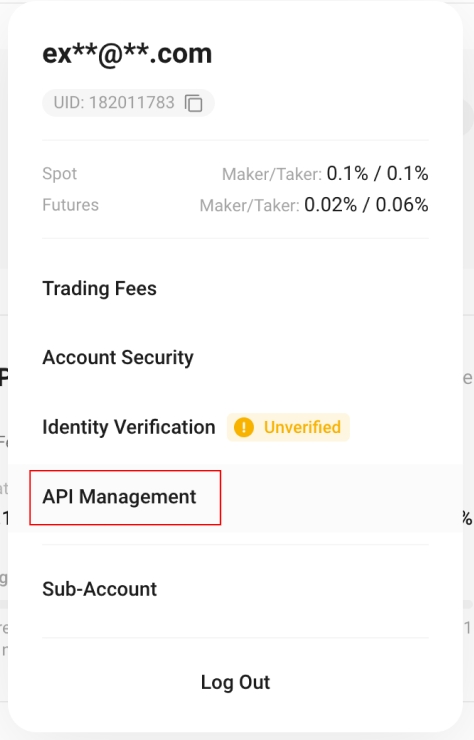
You can also generate an API key directly from Binance UI under the account settings section: "API Management".
When creating a key we recommend naming the API key - "inabit", so there won't be any confusion with other future/existing keys.
Within the inabit platform, go to the wallets page and click on "Add new".
Select the option "Exchange Wallet" and choose the "Binance" option.
Fill in the following details:
If all credentials are okay and the wallet name is valid, the connection should be successful and you can start managing the binance wallet in your organization!
Create inabit API wallets in your organization
The CreateApiWalletAddress mutation allows API admins to create a new inabit API wallet with a designated address for a given asset & blockchain.
Remember to authenticate to call our graphQL API using an access token (bearer) with your API Admin credentials. (If you're not sure how, refer to Authentication)
Don't have an API Admin user yet? contact us at [email protected] to create one!
Example body:
In the mutation's response, you will receive the created api wallet ID including the associated blockchain address.
A breakdown of an example GraphQL mutation in inabit
Mutations in GraphQL are operations used to modify data on the server. This example demonstrates how to create a withdrawal request.
The operation is named CreateWithdrawal.
1. Query to Retrieve Necessary Information:
This query fetches the IDs of the wallet, financial asset, and blockchain associated with the withdrawal. These IDs are required for creating the withdrawal request.
2. Mutation to Create Withdrawal:
The process begins with a query to retrieve the IDs of the wallet, financial asset, and blockchain related to the withdrawal. These IDs are then passed as variables along with other necessary details (such as withdrawal amount, destination address, and priority level) to the mutation CreateWithdrawal. The mutation creates the withdrawal request using the provided data and the authorization token (jwtToken).
Upon successful execution of the mutation, the response contains the ID of the created withdrawal request.
Which blockchains & protocols inabit currently supports
inabit supports major blockchain protocols (mainnet) and nearly limitless digital assets in its system. This page gives an overview of all of the blockchains we support.
Not all blockchains function identically, so we support different features depending on the technical constraints of each blockchain. In the table below, you can compare which broad feature sets are supported on which blockchains.
The list below is relevant only for inabit native wallets.
If you connected an exchange, all of its blockchains and assets are automatically supported in inabit.
Kucoin Exchange Integration with inabit
Refer to the to learn how to generate an API key.
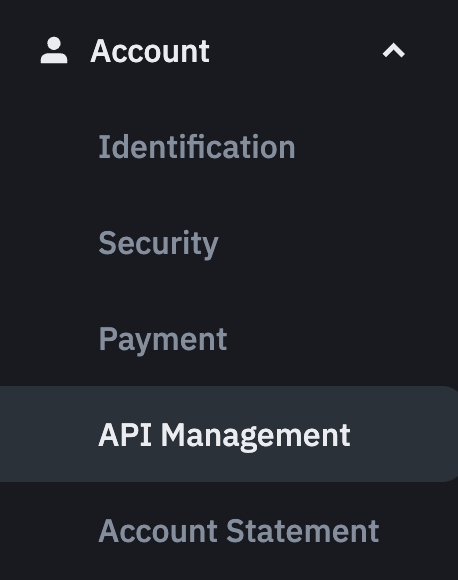
You can also generate an API key directly from Kucoin UI under the account settings section: "API Management".
When creating a key we recommend naming the API key - "inabit", so there won't be any confusion with other future/existing keys.
After you confirm the validity of your new API key, keep a record copy of both the API Key and Secret Key. You will need them when adding this exchange to your organization.
Make sure you've enabled the following API restrictions when generating the keys:
General
Spot Trading
Transfer
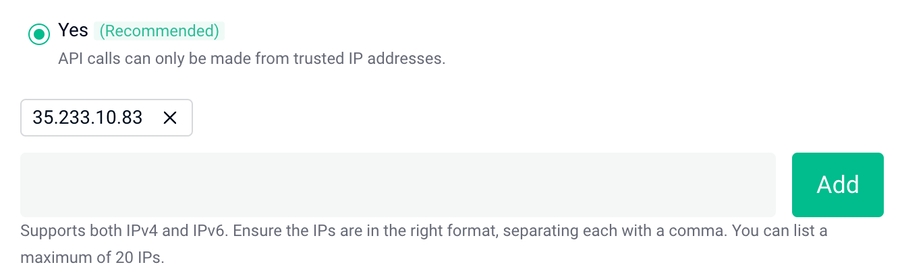
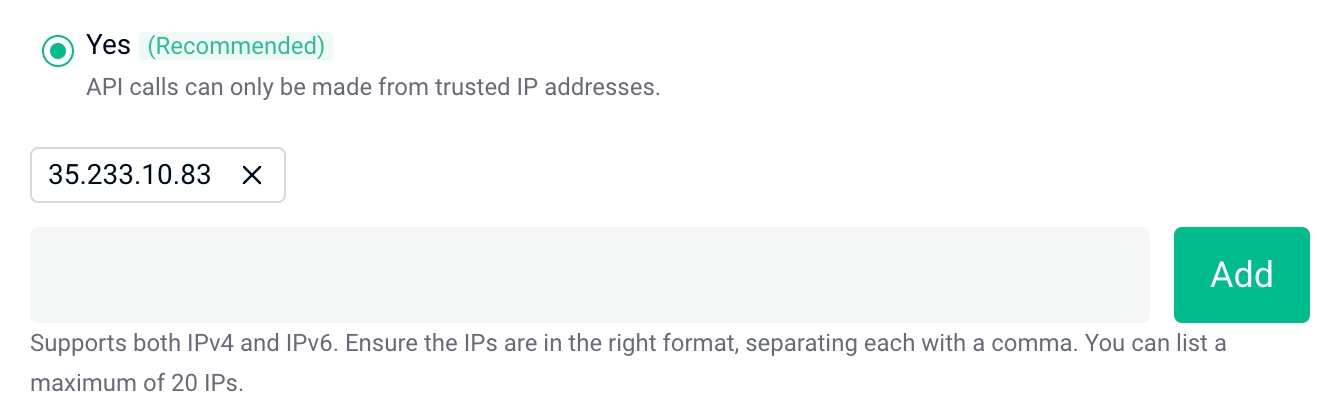
Under the IP Restriction section, click on "Yes" and add the following IP to the list, as follows:
Within the inabit platform, go to the wallets page and click on "Add new".
Select the option "Exchange Wallet" and choose the "Kucoin" option.
Fill in the following details:
If all credentials are okay and the wallet name is valid, the connection should be successful and you can start managing the Kucoin wallet in your organization!
Fetching an existing coin/asset blockchain address within a wallet
The GetOrCreateDepositAddress query allows API users to fetch an existing blockchain address for an asset & blockchain in their wallet. If there isn't one, the query will return an error and you will need to use query beforehand to add a coin first.
Do note that currently, this query is called
GetOrCreateDepositAddresswhile in fact this query cannot create/generate a new blockchain deposit address for a wallet. This confusion will be fixed and deprecated in future versions of the API.
Which assets & tokens inabit currently supports
inabit supports multiple assets
It is important to note that all assets and tokens within standards we support such as ERC-20 (or equivalent, e.g. BEP-20 or TRC-20) are supported by our wallets.
The table below provides the native assets (Blockchain assets) that we supports (that aren't tokens).
As for tokens, inabit will support all tokens within the blockchains and standards that it currently supports. See supported blockchains list .
Table Columns:
query Organization($where: OrganizationWhereUniqueInput!) {
  organization(where: $where) {
    contacts {
      id
      fullName
      email
      phone
    }
  }
}query FinancialAssets($where: FinancialAssetWhereInput) {
financialAssets(where: $where) {
code
id
}
}mutation DisconnectWallet($walletId: String!) {
disconnectWallet(walletId: $walletId) {
success
}
}inabit. x Changelly - Added the ability to swap in inabit wallets.
Transaction Confirmations to transactions:
Ability to define required confirmations before transactions are counted as completed and affecting your wallets & organization balance.
Added new status: "Confirming" for transactions.
Track incoming & outgoing funds with ease:
inabit now displays indicators for incoming and outgoing pending balances on both wallets and assets, affected by pending transactions.
Effortless navigation between assets & wallets:
Revampled the way to move between assets & wallets in the platform.
Web3 - WalletConnect support:
Users can fully perform a connection to any wallet supported by walletconnet to inabit's platform.
We've released the ability to perform a full disaster recovery in inabit.
Fixed:
Changed the previous Ethereum base-fee calculation in order to significantly lower the probability of Ethereum transactions failures
Bitcoin Transactions Acceleration
Increased support of different countries & currencies for off-ramp.
Additional security updates in the mobile approvals app.
New API Features:
Generation of dedicated API wallets via API.
Ability to sign transactions directly through API (API Signer).
Visual representation of API wallets in the platform's UI.
Added by Itamar Korkos 4.1.2024
Added by Itamar Korkos 4.1.2024
blockchainId*
string
ID of the blockchain in inabit
financialAssetId*
string
ID of the financial asset in inabit (can be token/native)
organizationId*
string
ID of the organization in inabit
Here, fieldName represents the name of the field you want to retrieve. It could be a property of an object type, a scalar value, or even a nested object.
Each field in a GraphQL query corresponds to a resolver function on the server side. These resolver functions are responsible for fetching the data for their corresponding fields. Resolvers are executed in a hierarchical manner, starting from the root fields and traversing down through nested fields.
One of the powerful features of GraphQL is its ability to retrieve nested fields within a single query. This allows you to fetch complex, hierarchical data structures in a single round trip to the server. For example:
In this query, user is a field that returns an object type with nested fields name, email, and posts, which in turn have their own nested fields.
GraphQL allows you to alias fields in a query to customize the shape of the response. This is particularly useful when you need to retrieve multiple fields with the same name or when you want to improve readability. Here's an example:
In this query, adminUser is an alias for the user field, and fullName and emailAddress are aliases for the name and email fields respectively.
Fragments in GraphQL allow you to define reusable sets of fields, which can be included in multiple queries. This helps in reducing redundancy and maintaining a cleaner codebase. Here's how you can use fragments:
In this example, UserInfo is a fragment that defines the fields name and email. It is then included in the user query.
GraphQL directives provide a way to conditionally include or exclude fields based on certain criteria. The @include and @skip directives are commonly used for this purpose. Here's an example:
In this query, the posts field will only be included if the $includePosts variable is set to true.
Fields are the building blocks of GraphQL queries, allowing you to precisely specify the data you want to retrieve. With support for nested fields, aliases, fragments, and directives, GraphQL provides powerful tools for querying and shaping data efficiently.
Types:
Toy: Represents a toy object with properties like id, name, price, category, and inStock.
Query: Defines available data retrieval operations.
Mutation: Defines data manipulation operations (optional, not all APIs have mutations).
Query:
toys(category: String): Retrieves a list of toys based on an optional category filter.
toy(id: ID!): Fetches a specific toy by its ID.
Mutation:
createToy(name: String!, price: Float!, category: String!): Creates a new toy with provided details.
Query Example (Get all toys):
Query Example (Get a toy by ID):
Variables:
Response:
Mutation Example (Create a new toy):
This example demonstrates the fundamental concepts of using a GraphQL API. By understanding the schema, you can craft queries to retrieve specific data and potentially use mutations to interact with the data (if supported).
graphqlCopy codequery GetPost($postId: ID!) {
  post(id: $postId) {
    title
    body
  }
}jsonCopy code{
"query": "GetPost($postId: ID!) { post(id: $postId) { title body } }",
"variables": { "postId": "123" }
}graphqlCopy codequery GetPost($postId: ID!) {
post(id: $postId) {
title
body
}
}graphqlCopy codemutation UpdateProfile($userId: ID!, $input: ProfileInput!) {
updateProfile(userId: $userId, input: $input) {
success
message
}
}mutation CreateApiWalletAddress($data: ApiWalletCreateAddressInput!) {
createApiWalletAddress(data: $data) {
address
walletId
}
}{
"data": {
"blockchainId": "clefn78cl00i3lc6rih442mx9",
"financialAssetId": "clefn78h5012plc6rxbmofnop",
"organizationId": "clsu8bel7000dlciyfdfbmwcw"
}
}{
"data": {
"createApiWalletAddress": {
"address": "0xcc918e16bc528bf58fc250f56898c7d917d33de2",
"walletId": "cluicfnpb000066015d3narbc"
}
}
}{
"error": "Invalid request"
}query GetWalletAndBlockchainID {
wallet(id: "clol7o576002oaz011mmtnvru") {
id
}
financialAsset(id: "clefn78gv011olc6rcwtt0wel") {
id
}
blockchain(id: "clefn78em00mslc6r3lzf3h5a") {
id
}
}mutation CreateWithdrawal($data: WithdrawalCreateInput!, $jwtToken: String!) {
createWithdrawal(data: $data, jwtToken: $jwtToken) {
id
}
}{
"data": {
"wallet": {
"id": "clol7o576002oaz011mmtnvru"
},
"financialAsset": {
"id": "clefn78gv011olc6rcwtt0wel"
},
"address": "0x7582f3483116105e0b7845ac1a0df5eb0c8cd062",
"amount": 5,
"blockchain": {
"id": "clefn78em00mslc6r3lzf3h5a"
},
"note": "",
"priority": "Medium"
},
"jwtToken": "***[accessToken from login response]***"
}{
fieldName
}{
user {
name
email
posts {
title
content
}
}
}{
adminUser: user(id: "123") {
fullName: name
emailAddress: email
}
}fragment UserInfo on User {
name
email
}
{
user(id: "123") {
...UserInfo
}
}{
user(id: "123") {
name
email
posts @include(if: $includePosts) {
title
content
}
}
}type Toy {
id: ID!
name: String!
price: Float!
category: String!
inStock: Boolean!
}
type Query {
toys(category: String): [Toy!]!
toy(id: ID!): Toy
}
type Mutation {
createToy(name: String!, price: Float!, category: String!): Toy!
}query {
toys
}{
"data": {
"toys": [
{
"id": "1",
"name": "Stuffed Bear",
"price": 19.99,
"category": "Plushies",
"inStock": true
},
{
"id": "2",
"name": "Remote Control Car",
"price": 49.99,
"category": "Vehicles",
"inStock": false
}
]
}
}
query getToy($id: ID!) {
  toy(id: $id) {
    id
    name
    price
  }
}{
"id": "1"
}{
"data": {
"toy": {
"id": "1",
"name": "Stuffed Bear",
"price": 19.99
}
}
}mutation createToy($name: String!, $price: Float!, $category: String!) {
createToy(name: $name, price: $price, category: $category) {
id
name
price
category
}
}{
"name": "Building Blocks",
"price": 24.99,
"category": "Construction"
}{
"data": {
"createToy": {
"id": "3", // Generated by the server
"name": "Building Blocks",
"price": 24.99,
"category": "Construction"
}
}
}Make sure you've enabled the following API restrictions when generating the keys:
Reading
Withdrawals
Spot & Margin Trading (if you intend to swap assets directly from inabit in this wallet)
Under the IP restrictions access, please select Restrict access to trusted IPs only, discard the 0.0.0.0 IP address, and add the following IP:
API key (the one saved from Binance)
Secret key (the one saved from Binance)
Click on "Connect Exchange".
XRP (Ripple)
✓
Bitcoin Cash
Coming soon
Litecoin
Coming soon
Bitcoin
✓ (Acceleration using CPFP)
Ethereum
✓ (ERC-20 + ERC-1155)
Binance Smart Chain
✓
Polygon
✓
Solana
✓
Tron
✓ (TRC-20 + TRC-10)
API key (the one saved from Kucoin)
Secret key (the one saved from Kucoin)
Passphrase
Also known as "Trading Password"
(A required 6 digit password that you've set for Kucoin API)
Click on "Connect Exchange".
Content-Type
application/json
Authorization
Bearer <token>
walletId*
string
ID of the wallet
financialAssetId*
string
ID of the financial asset in inabit (can be token/native)
blockchainId*
string
ID of the blockchain in inabit
Example body:
Return values:
address
String
API Wallet Address
In the query's response, you will receive the created API wallet address for the wallet, asset & blockchain IDs given in the body.
Content-Type
application/json
Authorization
Bearer <token>
id*
string
Organization ID. See
Example body:
Returned values:
firstName
string
User first name
lastName
string
User last name
roles
JSON
Array of roles
Financial Asset - the name of the digital asset
Blockchain Code - the blockchain on which the asset exists
Content-Type
application/json
Authorization
Bearer <token>
note*
String
New transaction note
Id*
String
Transaction ID
Example body:
Return values:
id
String
Updated Transaction ID
Content-Type
application/json
Authorization
Bearer <token>
id*
string
Organization ID
id
string
Contact ID
fullName
string
Contact full name
string
Contact email
phone
string
Contract phone
Content-Type
application/json
Authorization
Bearer <token>
code
String
Asset Code (i.e. - USDT / ETH / BTC / MATIC)
code
String
Asset Code
id
String
Asset ID
Content-Type
application/json
Authorization
Bearer <token>
id*
String
Wallet ID
success
Boolean
Returns true if disconnect was successful, else false
A breakdown of an example GraphQL query in inabit
In GraphQL, queries are used to fetch data from the server. This example demonstrates how to retrieve detailed information about a transaction.
Let's walk through a more complex query and put this information in context.
The operation is named Transaction.
This query retrieves detailed information about a transaction identified by its unique ID ($where). Here's a breakdown of the fields being requested:
id: The unique identifier of the transaction.
transactionType: The type of the transaction.
createdAt: The timestamp indicating when the transaction was created.
Upon successful execution, the response contains detailed information about the requested transaction.
How to retrieve a JWT access token to perform queries and mutations in our GraphQL API
In order to access our API capabilities and authenticate queries and mutations, you must create an API Admin.
Note - You can also decide to create an API Viewer. Doing so you will only allow you to receive API capabilities of a Viewer.
Feel free to visit our user roles explanation page in the documentation to learn more about the API roles in the inabit platform, as well as the rest of the roles existing in inabit.
Contact inabit's support at to retrieve a JWT access token for you with admin permissions.
The token has access to all relevant mutations and queries in our schema.
These are the headers you insert when you authenticate to our GraphQL API root endpoint. You will always have to pass an authorization Bearer (token) for access to our queries mutations and webhooks (subscriptions) service.
Once you've contacted inabit's support and we've created the necessary API users per your request, we'll go ahead and create an API login token for your account.
The token will be shared with you/your team across a secured channel with inabit.
This login token serves as the bearer/authorization token to call for an access token to our GraphQL API schema that you will use to authorize queries and mutations.
Login tokens are valid for 30 days and should be refreshed by your end ahead of time before expiration.
Once you managed to retrieve a login token, you will use it to query an access token that for security reasons, will be valid for 15 minutes - to use in your queries and mutations of the API.
Access tokens are valid for 15 minutes and should be refreshed by your end ahead of time before expiration.
Before reaching the 30 day expiration time of your API user's login token, you'll need to use the following query to refresh/update the existing token.
You will then use the new login token given in the response in order to generate new access tokens and the previous token will be expired.
In the variables/body of this query, you will need to insert the current existing login token as the authorization/bearer for the query.
Create a swap request from a specific wallet.
Initiate a mutation to create an assets swap request for approval, from one of your organization's exchange wallets
Please note that all is applicable only for exchange wallet swaps.
Example body:
Return values:
Create a swap request from a specific wallet.
Initiate a mutation to create off ramp transaction request for approval, from one of your organization's inabit wallets.
Please note that this feature is permitted only for inabit wallets.
Example body:
Return values:
Which exchange connections inabit currently supports
inabit exchange connectivity enables you to connect exchange main accounts, allowing the following functionalities:
Funding exchange wallets: Deposit, withdraw and rebalance between your connected accounts.
Monitor wallet balances: Monitor assets, balances, and transactions for your connected accounts.
Send funds anywhere: Transfer to any other wallet / address (whitelisted/non-whitelisted).
All the exchanges connected to your inabit organization appear in the wallets page and are apart of your organization balance once connected.
Assets held on the exchange are included and shown in your wallet balance.
The primary account serves as the default gateway on the exchange platform. It acts as the central hub for inabit and other exchanges, exclusively facilitating deposits and withdrawals.
Depending on the exchange, you may need to whitelist destinations on the exchange to be able to withdraw to wallets and/or other destinations.
This feature is currently not supported in inabit.
Sub-accounts in exchanges refer to separate accounts created within a single user account. These accounts are often used to organize and manage different trading strategies, portfolios, or assets independently.
This feature is currently not supported in inabit.
Trading accounts in exchanges are the primary accounts created by users to engage in buying, selling, and exchanging cryptocurrencies or other financial assets. They serve as the main interface for conducting trading activities on the exchange platform.
Retrieve data on your organizations, per organization ID.
Retrieving the user's organization info is done through querying the user's information. One can query details inside the organization.
Example body:
Returned values:
Create a batch transfer request from multiple wallets to sweep funds
Update a specific contact's details
In order to call mutations such as money transfers and swaps, you will need to fetch the specific blockchain ID you wish to operate in. In order to get a specific blockchain/multiple blockchain IDs, use the following query:
In the query variables (body), you insert the blockchain name (or code depending on your preference) of the blockchain you wish to fetch. See the example body below for reference.
Create an inabit wallet in your organization
The CreateWalletWithInabit mutation allows API admins to create a new inabit wallet (that is accessible in the platform's interface, unlike API wallets) with a designated address for a given asset & blockchain.
Remember to authenticate to call our GraphQL API using an access token (bearer) with your API Admin credentials. (If you're not sure how, refer to )
Don't have an API Admin user yet? contact us at [email protected] to create one!
35.233.10.8335.233.10.83{
"data": {
"getOrCreateDepositAddress": {
"address": "0x429de487cF185eFBBEb3158D2FbC1C003462018c",
}
}
}{
"error": "Invalid request"
}query GetOrCreateDepositAddress($where: WalletDepositAddressWhereInput!) {
getOrCreateDepositAddress(where: $where) {
address
}
}{
"where": {
"walletId": "clmq35x0400009k01v5ptn7d5",
"assetId": "clefn78h5012plc6rxbmofnop",
"blockchainId": "clefn78cl00i3lc6rih442mx9"
}
}{
"data": {
"organization": {
"agents": [
{
"firstName": "Ahmad",
"lastName": "Carter",
"roles": [
"viewer"
]
},
{
"firstName": "Oda",
"lastName": "Pfeffer",
"roles": [
"signer"
]
},
{
"firstName": "Fredy",
"lastName": "Lesch",
"roles": [
"admin"
]
},
{
"firstName": "Earnest",
"lastName": "Blick",
"roles": [
"owner"
]
},
]
}
}
}query Organization($where: OrganizationWhereUniqueInput!) {
organization(where: $where) {
agents {
firstName
lastName
roles
}
}
}{
"where": {
"id": "organizationId123"
}
}{
"data": {
"updateTransaction": {
"id": "clpgvrjb700136g01lr3o0tgv",
}
}
}mutation UpdateTransaction($data: TransactionUpdateInput!, $where: TransactionWhereUniqueInput!) {
updateTransaction(data: $data, where: $where) {
id
}
}{
"data": {
"note": "made by api Admin"
},
"where": {
"id": "clpgvrjb700136g01lr3o0tgv"
}
}{
"where": {
"id": "orgId123"
}
}{
"data": {
"organization": {
"contacts": [
{
"id": "cljzumgy0000gk603zl8u9xx1",
"name": "Georgia Hermann"
},
{
"id": "cljzumh0n0019k603fzeaperq",
"name": "Eugene Labadie"
},
{
"id": "cljzumh2i0029k6039m3nmqvz",
"name": "Wesley Hermann"
},
{
"id": "cljzumh3i002rk603cho1skcx",
"name": "Erma Dach MD"
}
]
}
}
}{
"where": {
"code": {
"equals": "USDT"
}
}
}{
"data": {
"financialAssets": [
{
"code": "USDT",
"id": "clefn78gv011olc6rcwtt0wel"
}
]
}
}{
"walletId": "clpgvhulg000f6s0171foixj6"
}{
"data": {
"disconnectWallet": {
"success": true,
}
}
}query Wallets($where: WalletWhereInput) {
wallets(where: $where) {
id
name
}
}query User($where: UserWhereUniqueInput!) {
user(where: $where) {
organizations {
id
name
}
}
}createdBy: Information about the user who created the transaction, including their full name, first name, last name, user ID, and profile file ID.
txId: The transaction ID.
contactCryptoAccount: Details about the contact's crypto account, including the address, name, and contact's name.
kyt: KYT (Know Your Transaction) status.
wallet: Information about the wallet associated with the transaction, including its ID, name, external ID, associated organization ID, and exchange details.
financialAsset: Details about the financial asset involved in the transaction, such as its ID, code, name, and precision.
blockchain: Information about the blockchain associated with the transaction, including its ID, name, code, contract type, and network scanner URL.
amount: The amount involved in the transaction.
rateEUR and rateUSD: Exchange rates for EUR and USD.
status: The status of the transaction, including its category, status, exchange statuses, and transaction sub-statuses.
fee: The fee associated with the transaction.
note: Any additional notes or comments about the transaction.
swapAssetTo: Details about the asset swapped to, including its code and precision.
swapToAmount: The amount swapped to.
metaData: Additional metadata associated with the transaction, including its value and metadata field details.
Content-Type
application/json
Authorization
Bearer <token>
query Transaction($where: TransactionWhereUniqueInput!) {
  transaction: transaction(where: $where) {
    id
    transactionType
    createdAt
    createdBy {
      fullName
      firstName
      lastName
      id
      profileFile {
        id
      }
    }
    txId
    contactCryptoAccount {
      address
      name
      contact {
        name
      }
    }
    kyt
    wallet {
      id
      name
      externalId
      organization {
        id
      }
      organizationExchange {
        exchange {
          code
          id
        }
        id
      }
    }
    financialAsset {
      id
      code
      name
      precision
    }
    blockchain {
      id
      name
      code
      contractType
      networkScannerUrl
    }
    amount
    rateEUR
    rateUSD
    status {
      category
      status
      exchangeStatuses {
        status
      }
      transactionSubStatuses {
        subStatus
      }
    }
    fee
    note
    swapAssetTo {
      code
      precision
    }
    swapToAmount
    metaData {
      value
      transactionMetaDataField {
        id
        name
      }
    }
  }
}{
"where": {
"id": "clk10q8he002kk660o1ed8ud4"
}
}query Query {
getApiUserAccessToken
}{
"data": {
"getApiUserAccessToken": "ey......"
}
}query Query {
refreshApiUserLoginToken
}{
"data": {
"refreshApiUserLoginToken": "ey......"
}
}note
String
Transaction Note (optional)
Content-Type
application/json
Authorization
Bearer <token>
amount*
Integer
Transfer Amount (of the financialAsset)
walletId*
String
Wallet's ID
financialAssetId*
String
Financial Asset ID
blockchainId*
String
Blockchain ID
id
String
Off Ramp Transaction ID
status
String
Transaction Status
subStatus
String
Transaction Sub Status
Content-Type
application/json
Authorization
Bearer <token>
walletId*
String
Wallet ID
walletName*
String
Wallet's New name
Example body:
Return values:
id
String
Wallet ID
name
String
Updated Wallet Name
How do I retrieve my wallet ID?
In order to retrieve an organization's wallet ID, you'll need to call your organization wallets query first, to fetch the wallet's ID. The query below accepts a WalletWhereInput of an organizationId, and retrieves the wallet's ID and name in the response.
Automatic nginx and Docker Compose configuration
HTTPS support with auto-detected certificates (PEM or CRT/KEY)
Health checks and smart troubleshooting
One-command cleanup and uninstall
Clone the release repository on your remote instance and run the installer:
After installation, the global command inabit is available.
Notes:
During setup, HTTP 403 from curl can be normal if Cloudflare blocks non-browser requests; browsers should work.
The wizard treats 403/502/503 as acceptable during early startup while the approver initializes.
Domain
Port 80 (HTTP): server { listen 80; } that proxies to approver:${APPROVER_PORT}
Port 443 (HTTPS):
listen 80; redirects HTTP to HTTPS
listen 443 ssl; http2 on; uses detected cert/key under /etc/nginx/ssl/
Docker Compose ports exposed automatically: 80:80 and 443:443
IP + Port
Single server { listen <custom>; } with proxy to approver:${APPROVER_PORT}
Compose port exposed automatically: <custom>:<custom>
Supported certificate pairs to place in local ssl/:
cert.pem + key.pem
cert.crt + key.key
server.crt + server.key
domain.crt + domain.key
Docker
Docker Compose
Bash shell
Use the CLI to inspect status, logs, and perform restarts or cleanup:
This project is part of the Inabit Remote Approver service.
Content-Type
application/json
Authorization
Bearer <token>
id* (destinationWallet)
String
Wallet ID
id* (blockchain)
String
Blockchain ID
id* (financialAsset)
String
Asset ID
id* (Organization)
String
Organization ID
Example body:
Return values:
transactionId
String
Batch Transfer ID
Refer to the Kraken.com API Documentation to learn how to generate an API key.
When creating a key we recommend naming the API key - "inabit", so there won't be any confusion with other future/existing keys.
After you confirm the validity of your new API key, keep a record copy of both the API Key and Secret Key. You will need them when adding this exchange to your organization.
Make sure you've enabled the following API restrictions when generating the keys:
Query Funds
Deposit Funds
Withdraw Funds
Under the IP restrictions access, please select Restrict access to trusted IPs only, discard the IP address, and add the following IP:
Within the inabit platform, go to the wallets page and click on "Add new".
Select the option "Exchange Wallet" and choose the "Kraken" option.
Fill in the following details:
Wallet name
API key (the one saved from Kraken)
Secret key (the one saved from Kraken)
Click on "Connect Exchange".
If all credentials are okay and the wallet name is valid, the connection should be successful and you can start managing the Kraken wallet in your organization!
Before whitelisting a inabit address on Kraken, lets understand what are Kraken Descriptions and why are they crucial for transferring through Kraken connected wallets.
Kraken descriptions are essentially tags that are generated automatically by inabit per deposit address in the platform. This tag is later used by Kraken to whitelist an address that users wish to send funds to. Within the money transfer UI, users will be able to transfer to any address (unnecessarily whitelisted) via their Kraken wallet.
While kraken doesn’t allow users to send funds to non-whitelisted addresses, in order to allow such option in inabit, inabit overcomes this by generating a description per every saved address under a contact in inabit.
Now that we understand that in order to transfer we must save destination addresses within a contact in inabit, verify that the following are also completed:
Your Kraken wallet is fully connected to your inabit organization.
Your Kraken wallet has funds and was KYC/KYB verified.
Follow the instructions below to whitelist in Kraken.
If you are still having trouble, contact [email protected].
Click on "Withdraw" funds.
Cick on "Add new withdrawal address"
Add the following details:
Address Description
This is where you copy the Kraken description generated for the saved address in inabit.
You can copy the Kraken description in inabit from within the contacts page. View the saved address in the page and click on the 3 dots icon:
Click on the "Kraken Description" option.
Address (according to the designated blockchain)
Click on "Add Withdrawal Address"
You will be required to confirm the action via email. Once the confirmation is received, the address is familiar to Kraken and is saved in your exchange account.
That's it! inabit now recognizes the whitelisted address in Kraken and you're able to transfer funds to the saved destination address through inabit's UI/API.
You will also be able to see the generated Kraken description of a saved address when you select the destination address for the transfer in the Transfer UI.
Content-Type
application/json
Authorization
Bearer <token>
One of/both:
name
String
Blockchain Name
code
String
Blockchain Code
Example body:
Return values:
id*
String
Blockchain ID
name
String
Blockchain Name
code
String
Blockchain Code
Content-Type
application/json
Authorization
Bearer <token>
amount*
Integer
Swap Amount
financialAsset*
String
ID of Swapped From Asset
swapAssetTo*
String
ID of Swapped To Asset
walletId*
String
inabit Wallet ID
Example body:
Return values:
id
String
Swap ID
amount
Integer
Swap Amount
fee
Integer
Fee Amount (in Native Asset of the "From Asset")
Content-Type
application/json
Authorization
Bearer <token>
Id*
String
Wallet ID
isArchived*
Boolean
Archived or not (flag)
Example body:
Return values:
Id*
String
Wallet ID
isArchived*
Boolean
Archived or not (flag)
How do I retrieve my wallet ID?
In order to retrieve an organization's wallet ID, you'll need to call your organization wallets query first, to fetch the wallet's ID. The query below accepts a WalletWhereInput of an organizationId, and retrieves the wallet's ID and name in the response.
Content-Type
application/json
Authorization
Bearer <token>
name*
string
Name of the wallet
organizationId*
string
ID of the organization in inabit
Example body:
Return values:
id
String
Created Wallet ID
name
String
Created Wallet Name
In the mutation's response, you will receive the created API wallet ID including the associated blockchain address.
Content-Type
application/json
Authorization
Bearer <token>
amount*
Integer
Swap Amount
financialAsset*
String
Coin to swap
swapAssetTo*
String
Coin to swap to
walletId*
String
Wallet ID
id
String
Swap ID
amount
Integer
Swap Amount
fee
Integer
Fee Amount
orderType
String
Type of the order (Market/Limit) (will always be market)
Content-Type
application/json
Authorization
Bearer <token>
id*
string
ID of the logged in user. See Authorization.
id
string
Organization ID
name
string
Organization name
BTC
bitcoin
ETH
ethereum
TRX
tron
BNB
binance-smart-chain
SOL
solana
XRP
XRP
MATIC
polygon


Retrieve all transactions in an organization, per organization ID.
Retrieve data on your organizations, per organization ID.
Retrieving the user's organization info is done through querying the user's information. One can query details inside the organization.
Example body:
Returned values:
In the example response above, we queried the id , name and city of the organization.
Fetch a specific contact's information in an inabit organization.
Fetch a specific contact's data in an inabit organization, according to the contact's ID.
Using this endpoint users can search specific contacts using their ID (the call must be per contact ID).
The response contains the contact’s information including: contact name, ID, address, blockchain, blockchain code and more.
Example body:
Return values:
Explore which notifications you can receive from our subscriptions
Notifications from Inabit's webhook service provide real-time updates on transaction events and status changes, ensuring that you stay informed about crucial activities within your organization. Below are the different types of notifications you can expect to receive:
New Transaction Event:
Date and Time: Timestamp indicating when the transaction occurred.
Transaction Type: Whether it's a deposit (received) or a withdrawal (sent).
Transaction ID: Unique identifier for the transaction.
Transaction Status: Current status of the transaction.
Wallet ID: Identifier for the wallet associated with the transaction.
Wallet Name: Name of the wallet involved in the transaction.
Address Name: Name of the address involved in the transaction.
Coin/Asset Symbol: Symbol representing the cryptocurrency involved.
Blockchain: Name of the blockchain associated with the transaction.
Cryptocurrency Amount: Amount of cryptocurrency transacted.
Fee in Cryptocurrency: Transaction fee in cryptocurrency.
Fee (in Organization's Base Currency): Transaction fee converted to the organization's base currency.
Amount (in Organization's Base Currency): Transaction amount converted to the organization's base currency.
Transaction Hash: Unique hash identifying the transaction.
Source Address (From): Address from which the cryptocurrency was sent.
Destination Address (To): Address to which the cryptocurrency was sent.
Transaction Status Updates (Including Transaction Fee Updates):
Similar details as the new transaction event, with updates on the transaction status and associated fees + transaction hash (if completed).
These notifications empower you to track and manage transactions effectively, enabling timely decision-making and ensuring transparency and security within your crypto service.
Withdrawal Example:
Deposit Example:
This notification is received for every transaction status change.
Here are the possible changes you can receive notifications on:
Status changed to Processing:
Once you approve a transaction, its status should change to this.
Status changed to Broadcasting:
Status changes to Broadcasting:
Status changes to Completed:
Once you receive updates on completion of transactions (status changes to completed), the fees are also updated and are given in the notification data (no longer null):
Notice the fees are given in both the crypto native currency (in the example above - ethereum) but also in the base currency, which is the base currency of the organization (EUR/USD).
fee
baseCurrencyFee
Create a money transfer request from a specific wallet.
Initiate a mutation to create an assets transfer request to send for approval from one of your organization's wallets.
Important Note - Naming convention for this process is slightly different than what's presented in our interface.
In our platform "withdrawals" are described as "Money Transfers" while in our API, the mutation is called createWithdrawal.
Example body:
Return values:
Adding a new coin/asset to a wallet (Generates a new wallet blockchain deposit address)
The AddCoinAddress query allows API users to add a new coin into their API wallet/s. This action will generate a new blockchain address in the wallet.
Remember to authenticate to call our GraphQL API using an access token (bearer) with your API Admin credentials. (If you're not sure how, refer to Authentication)
Don't have an API Admin user yet? contact us at [email protected] to create one!
Example body:
Return values:
In the query's response, you will receive the created API wallet address for the asset & blockchain given in the body.

mutation CreateOfframpTransaction($data: OfframpCreateInput!) {
  createOfframpTransaction(data: $data) {
    id
    status {
      status
    }
    subStatus {
      subStatus
    }
  }
} {
"data": {
"amount": 15000,
"wallet": {
"id": "clp5bm4f1002icg01d526dgw9" # inabit wallet iD
}
"financialAsset": {
"id": "clefn78h5012plc6rxbmofnop" # USDT Asset
},
"blockchain": {
"id": "clefn78gv011olc6rcwtt0wel" # Ethereum network
},
"note": "Transfer to my bank account" # Optional note of the transaction
}
}{
"data": {
"CreateOfframpTransaction": {
"id": "clph3mik5000t8f01qqr0ol71",
"status": "Processing",
"subStatus": "Fiat Processing" # crypto was sent, fiat transfer is being processed
}
}
}{
"data": {
"updateWallet": {
"id": "clllyfdk6006ybtqkwk840uei",
"name": "New Wallet Name"
}
}
}mutation UpdateWallet($where: WalletWhereUniqueInput!, $data: WalletUpdateInput!) {
updateWallet(where: $where, data: $data) {
id
name
}
}{
"where": {
"id": "clllyfdk6006ybtqkwk840uei"
},
"data": {
"name": "New Wallet Name"
}
}query Wallets($where: WalletWhereInput) {
wallets(where: $where) {
id
name
}
} /$$ /$$ /$$ /$$
|__/ | $$ |__/ | $$
/$$ /$$$$$$$ /$$$$$$ | $$$$$$$ /$$ /$$$$$$
| $$| $$__ $$ |____ $$| $$__ $$| $$|_ $$_/
| $$| $$ \ $$ /$$$$$$$| $$ \ $$| $$ | $$
| $$| $$ | $$ /$$__ $$| $$ | $$| $$ | $$ /$$
| $$| $$ | $$| $$$$$$$| $$$$$$$/| $$ | $$$$//$$
|__/|__/ |__/ \_______/|_______/ |__/ \___/ |__/# Clone the release bundle (contains installer + docker-compose.yml)
git clone https://your-release-repo-url.git approver-cli
cd approver-cli
# Install as current user (no sudo needed)
bash inabit-cli-installation-v1.0.sh
# Or system-wide (requires sudo)
# sudo bash inabit-cli-installation-v1.0.sh# Run the guided setup
inabit setup
# Check status / logs
inabit status
inabit logs
# Manage services
inabit restart
inabit stop
inabit start
# Cleanup everything created by setup (keeps Docker images)
inabit cleanup
# Uninstall the CLI and remove the global "inabit" command
inabit uninstall
# For system-wide installs, use: sudo inabit uninstallrelease/
├── inabit-cli-installation-v1.0.sh # Installer
├── docker-compose.yml # Docker services configuration
└── README.md# Status / Logs
inabit status
inabit logs
# Restart / Cleanup
inabit restart
inabit cleanup{
"data": {
"sweepWallets": {
"transactionId": "tx-46a89bcf-33d3-4a88-90de-59c5f201b9ab"
}
}
}{
}mutation SweepWallets($data: SweepTransactionInput!) {
sweepWallets(data: $data) {
transactionId
}
}{
"data": {
"destinationWalletId": "master-wallet",
"blockchain": {
"id": "clefn78h5012plc6rxbmofnop"
},
"financialAsset": {
"id": "cmaa9a52t24s28n018pz2zle4"
},
"organization": {
"id": "org-98765"
},
"sourceWalletIDs": ["wallet-001", "wallet-002"]
}
}
}35.233.10.83{
"data": {
"blockchains": [
{
"id": "clefn78cb00h9lc6rdemx563g",
"name": "Bitcoin",
"code": "bitcoin"
}
]
}
}query Blockchains($where: BlockchainWhereInput) {
blockchains(where: $where) {
id
name
code
}
}{
"where": {
"name": {
"equals": "Bitcoin"
}
}
}{
"data": {
"createSwap": {
"id": "clph3mik5000t8f01qqr0ol74",
"amount": 0.0051,
"fee": 0.0014,
}
}
}{
"errors": [
{
"code": "OPERATION_FAILED",
"message": "No InabitWalletSupportedPair found",
"path": [
"createInabitWalletSwap"
],
"extensions": {
"code": "OPERATION_FAILED",
"message": "No InabitWalletSupportedPair found"
}
}
],
"data": null
}mutation CreateInabitWalletSwap($data: InabitWalletSwapCreateInput!) {
createInabitWalletSwap(data: $data) {
id
amount
fee
orderType
}
}{
"data": {
"amount": 0.0051,
"blockchain": {
"id": "" // FILL WITH CORRECT ID
},
"financialAsset": {
"id": "clefn78h5012plc6rxbmofnop"
},
"note": null,
"swapToBlockchain": {
"id": "" // FILL WITH CORRECT ID
},
"swapAssetTo": {
"id": "clefn78gv011olc6rcwtt0wel"
},
"wallet": {
"id": "clp5bm4f1002icg01d526dgw9"
},
"isAccelerated": null,
}
}{
"data": {
"updateWallet": {
"id": "clpgvhulg000f6s0171foixj6",
"isArchived": true, // false for unArchived
}
}
}mutation UpdateWallet($where: WalletWhereUniqueInput!, $data: WalletUpdateInput!) {
updateWallet(where: $where, data: $data) {
id
isArchived
}
}{
"where": {
"id": "clllyfdk6006ybtqkwk840uei"
},
"data": {
"isArchived": true
}
}query Wallets($where: WalletWhereInput) {
wallets(where: $where) {
id
name
}
}{
"data": {
"createWalletWithInabit": {
"id": "clvw5p0oj000er47qhe3atv9d",
"name": "My Inabit Wallet",
}
}
}{
"error": "Invalid request"
}mutation CreateWalletWithInabit($data: WalletCreateWithInabitInput!) {
createWalletWithInabit(data: $data) {
id
name
}
}{
"data": {
"name": "My Inabit Wallet",
"organization": {
"id": "clu6oj0kg0004r4ub98guo82u"
}
}
}mutation CreateSwap($data: SwapCreateInput!) {
createSwap(data: $data) {
id
amount
fee
orderType
}
}{
"data": {
"amount": 0.0051,
"financialAsset": {
"id": "clefn78h5012plc6rxbmofnop"
},
"swapAssetTo": {
"id": "clefn78gv011olc6rcwtt0wel"
},
"wallet": {
"id": "clp5bm4f1002icg01d526dgw9"
}
}
}{
"data": {
"createSwap": {
"id": "clph3mik5000t8f01qqr0ol74",
"amount": 0.0051,
"fee": null,
"orderType": "Market"
}
}
}{
"where": {
"id": "userId123"
}
}{
"data": {
"user": {
"organizations": [
{
"id": "clilpvru98723678mwie82oihn9",
"name": "Crypto Org 1"
}
]
}
}
}{
"error": "Invalid request"
}query Transaction($where: TransactionWhereUniqueInput!) {
transaction(where: $where) {
id
amount
blockchain {
name
code
}
createdAt
createdBy {
fullName
}
fee
note
status {
status
}
wallet {
name
id
}
financialAsset {
code
}
isAccelerated
priority
rateUSD
rateEUR
kyt
}
}query User($where: UserWhereUniqueInput!) {
user(where: $where) {
fullName
organizations {
[id]
[name]
[city]
[email]
[industry]
[isIndividual]
[phone]
[street]
[phoneCountry]
[timezone]
[transferRequestOrders]
[unit]
[wallets]
[zipCode]
}
}
}query Contact($where: ContactWhereUniqueInput!) {
contact(where: $where) {
id
contactCryptoAccounts {
address
blockchainProtocol {
code
}
lastTransferRequestDate
name
}
name
}
}Choose 80 (HTTP) or 443 (HTTPS)
Generate nginx.conf
Auto-update docker-compose ports
Detect SSL files in ./ssl (PEM or CRT/KEY)
IP + Port:
Generate nginx.conf and map chosen port


Status changed to Confirming:
The transaction entered the mempool and is awaiting sufficient confirmations amount to be completed. (This status is only applicable for incoming deposit transactions)
Status changed to Completed:
The transaction was completed in the blockchain.
In this notification you'll also receive additional data that includes:
The transaction fees breakdown.
The transaction's hash.
Status changed to Failed:
Transaction failures can occur in the blockchain during broadcasting process or before that, in the processing phase in case any issue occured. (For example - insufficient gas fees to broadcast the transaction)
Status changed to Rejected:
If the approver/s rejected the transaction in the mobile app, the status will be turned "Rejected".
Status changed to Expired:
Transactions have a 5 hour window to be approved/rejected.
In case the time limit was reached, the transaction is expired and its status changes to "Expired".
transactionHash of the completed transaction in this notification.{
"createTime": "2024-04-01T12:21:00.205Z",
"transactionType": "Withdrawal",
"transactionId": "clugx5j1p000pvj4wgog8amvc",
"transactionStatus": "PendingApproval",
"walletId": "clu1dzpw00015vjto6gxeld8w",
"walletName": "My inabit Wallet",
"addressName": "inabit Wallet Ethereum",
"coin": "ETH",
"blockchain": "Ethereum",
"amount": 0.00034,
"baseCurrencyAmount": 0.5951873640866312,
"fee": null,
"baseCurrencyFee": null,
"transactionHash": null,
"sourceAddress": "0xd92a0778ee3f6c35c79407e1611d0dd5543b631f",
"destinationAddress": "0xaf79d75c836aa10195ce358fc592fbbc2b0c62cc"
}{
"createTime": "2025-03-11T17:59:44.861Z",
"transactionType": "Deposit",
"transactionId": "cm84sq6zh004ddr01yr8g0r39",
"transactionStatus": "Confirming",
"walletId": "cm84shdsx04g0ch01l40x905d",
"walletName": "LTC API Wallet ee69fb32-3025-4",
"addressName": "LTC LTC Wallet Crypto Account",
"walletCryptoAccountId": "cm84shemf04gech015elwptjy",
"coin": "LTC",
"blockchain": "Litecoin",
"amount": 0.50198254,
"baseCurrencyAmount": null,
"fee": 0,
"baseCurrencyFee": null,
"transactionHash": "019339708b4ec4a6ee283b19d3522465f463e12f9ea634b5f36a9e7402df85dd",
"sourceAddress": "ltc1qe55jghmyygaradusguc3zn50l2cal3sckdapw2",
"destinationAddress": "ltc1qqq2rj0jpdthjau793selr9qf8ft4ucsv28e6gd"
}{
"createTime": "2024-04-01T12:21:00.205Z",
"transactionType": "Withdrawal",
"transactionId": "clugx5j1p000pvj4wgog8amvc",
"transactionStatus": "Broadcasting",
"walletId": "clu1dzpw00015vjto6gxeld8w",
"walletName": "My inabit Wallet",
"addressName": "inabit Wallet Ethereum",
"coin": "ETH",
"blockchain": "Ethereum",
"amount": 0.00034,
"baseCurrencyAmount": 0.5951873640866312,
"fee": null,
"baseCurrencyFee": null,
"transactionHash": null,
"sourceAddress": "0xd92a0778ee3f6c35c79407e1611d0dd5543b631f",
"destinationAddress": "0xaf79d75c836aa10195ce358fc592fbbc2b0c62cc"
}{
"createTime": "2024-04-01T12:21:00.205Z",
"transactionType": "Withdrawal",
"transactionId": "clugx5j1p000pvj4wgog8amvc",
"transactionStatus": "Completed",
"walletId": "clu1dzpw00015vjto6gxeld8w",
"walletName": "My inabit Wallet",
"addressName": "inabit Wallet Ethereum",
"coin": "ETH",
"blockchain": "Ethereum",
"amount": 0.00034,
"baseCurrencyAmount": 0.5951873640866312,
"fee": 0.0013,
"baseCurrencyFee": 4.38,
"transactionHash": "0x6a5599d82e56ea89a218f76162cb28c29e28e3e85923ef6dd4cdba8aeec87149",
"sourceAddress": "0xd92a0778ee3f6c35c79407e1611d0dd5543b631f",
"destinationAddress": "0xaf79d75c836aa10195ce358fc592fbbc2b0c62cc"
}createdAt
String
Creation Time of Transaction
fullName (createdBy)
String
Full Name of the User Created the Transaction
fee
Integer
Fee Amount
note
String
Tranasaction Note (can be empty)
status
String
Status
name (wallet)
String
Wallet Name
id (wallet)
String
Wallet ID
code (financialAsset)
String
FinancialAsset Code (i.e - "ETH" / "BTC")
isAccelerated
Boolean
Flag that indicates wether the transaction is . (true/false)
priority
String
Transaction Priority (Slow, Medium, Fast, etc.)
rateUSD
Integer
Asset Rate at the time of the transaction (in USD)
rateEUR
Integer
Asset Rate at the time of the Transaction (in Euro)
kyt
String
KYT (Know-Your-Transaction) risk score. 0 - Worst score 10 - Best Score
Content-Type
application/json
Authorization
Bearer <token>
id*
string
Transaction ID
id
String
Transaction ID
amount
Integer
Transaction Amount
name (blockchain)
String
Blockchain Name
id (blockchain)
String
Blockchain ID
industry
string
Organization industry
isIndividual
boolean
Flag wether organization or individual
phone
string
Organization phone number
phoneCountry
string
Organization country
street
string
Organization address (street)
transferRequestOrders
TransferRequestOrder
Transfer Request Orders
timeZone
TimeZone
Time zone for organization
unit
string
Unit
wallet
Wallet
Organization wallets
zipCode
string
Organization address (zip code)
Content-Type
application/json
Authorization
Bearer <token>
id*
string
ID of the organization in inabit
id
string
Organization ID
name
string
Organization name
city
string
Organization address (city)
string
Organization POC email
name (contactCryptoAccounts)
String
Name (of the contact's contactCryptoAccount)
name
String
Contact Name
Content-Type
application/json
Authorization
Bearer <token>
id*
String
Contact ID
id
String
Contact ID
address (contactCryptoAccounts)
String
Blockchain Address (per contactCryptoAccount given)
code (blockchainProtocol)
String
Blockchain Code
lastTransferRequestDate
Datetime
Last Transfer Request Date
id* (blockchain)
String
Blockchain ID
note
String
Transaction Note
priority
String
Transaction Priority
(Slow, medium, fast, etc.)
Content-Type
application/json
Authorization
Bearer <token>
id*
String
Wallet ID
id* (financialAsset)
String
Asset ID
address*
String
Destination Address (To)
amount*
Integer
Transfer amount
id
String
Withdrawal ID
Content-Type
application/json
Authorization
Bearer <token>
id*
string
Organization ID
Example body:
How do I retrieve my organization ID?
In order to retrieve an organization's identifier, you'll need to call your user details first, to understand which organization is related to them.
Return values:
id
String
Wallet ID
name
Integer
Wallet Name
balanceUSD
String
Balance in USD
balanceEUR
String
Balance in Euro
How do I retrieve my organization ID?
In order to retrieve an organization's identifier, you'll need to call your user details first, to understand which organization is related to them.
id* (sourceWalletIds)
String
Source Wallet IDs
note
String
Internal Note on the Swap
isAccelerated
boolean
Always keep as null
Content-Type
application/json
Authorization
Bearer <token>
walletId*
string
ID of the wallet
financialAssetId*
string
ID of the financial asset in inabit (can be token/native)
blockchainId*
string
ID of the blockchain in inabit
address
String
API Wallet Address


Update a specific contact's details
Fetch a specific contact's data in an inabit organization, according to the contact's ID.
By this endpoint, users can update an existing contact details in their organization.
Example body:
Return values:
How do I retrieve my organization ID?
In order to retrieve an organization's identifier, you'll need to call your user details first, to understand which organization is related to them.
{
  "where": {
    "id": "clllyfhdj00w9btqke47wsesf"
  }
}{
"data": {
"transaction": {
"id": "clllyfhdj00w9btqke47wsesf",
"amount": 941.93,
"blockchain": {
"name": "Ethereum",
"code": "ETH"
},
"createdAt": "2023-08-22T06:58:14.071Z",
"createdBy": null,
"fee": 1.36,
"note": "Voluptas nihil dolorem qui explicabo libero earum.",
"status": {
"status": "Pending"
},
"wallet": {
"name": "Organization Wallet 4",
"id": "clllyfexn00h0btqkyed7tgqg"
},
"financialAsset": {
"code": "ETH"
},
"isAccelerated": false,
"priority": "Fast",
"rateUSD": 3640.44,
"rateEUR": 3351.94,
"kyt": 4
}
}{
"errors": [
{
"message": "Unauthorized",
"extensions": {
"code": "UNAUTHENTICATED",
"response": {
"statusCode": 401,
"message": "Unauthorized"
}
}
}
],
"data": {
"transaction": null
}
}{
"where": {
"id": "userId123"
}
}{
"data": {
"user": {
"organizations": [
{
"id": "clilpvru98723678mwie82oihn9",
"name": "Crypto Org 1",
"city": "New York"
}
]
}
}
}{
"error": "Invalid request"
}{
"where": {
"id": "cljzumgy0000gk603zl8u9xx2"
}
}{
"data": {
"contact": {
"id": "cljzumgy0000gk603zl8u9xx1",
"contactCryptoAccounts": [
{
"address": "0xbd78e1bdd7fca39ac7a4c8cdeb89fc2bfcc57a0a",
"blockchainProtocol": {
"code": "account"
},
"lastTransferRequestDate": null,
"name": "Credit Card Account"
}
],
"name": "Georgia Hermann"
}
}
}mutation CreateWithdrawal($data: WithdrawalCreateInput!) {
createWithdrawal(data: $data) {
id
}
}{
"data": {
"wallet": {
"id": "clol7o576002oaz011mmtnvru"
},
"financialAsset": {
"id": "clefn78gv011olc6rcwtt0wel"
},
"address": "0x7582f3483116105e0b7845ac1a0df5eb0c8cd062",
"amount": 5,
"blockchain": {
"id": "clefn78em00mslc6r3lzf3h5a"
},
"note": "",
"priority": "Medium"
}
}{
"data": {
"createWithdrawal": {
"id": "clpgvrjb700136g01lr3o0tgu",
}
}
}{
}{
"data": {
"wallets": [
{
"id": "clllyfdl8007jbtqksgcgx1wy",
"name": "Wallet 1",
"balanceUSD": 0,
"balanceEUR": 0,
"walletCryptoAccounts": []
},
{
"id": "clnleemkg0000780172yr8115",
"name": "Wallet 2",
"balanceUSD": 0,
"balanceEUR": 0,
"walletCryptoAccounts": []
},
{
"id": "cln1qt5p400005b012sohm0sx",
"name": "Wallet 3",
"balanceUSD": 0,
"balanceEUR": 0,
"walletCryptoAccounts": []
},
{
"id": "cln1p10nm00006b016ow1abpj",
"name": "Wallet 4",
"balanceUSD": 305.41,
"balanceEUR": 301.96,
"walletCryptoAccounts": [
{
"balance": 0.05591,
"financialAsset": {
"code": "ETH"
},
"blockchain": {
"code": "ethereum"
}
}
]
}{
"errors": [
{
"message": "Unauthorized",
"extensions": {
"code": "UNAUTHENTICATED",
"response": {
"statusCode": 401,
"message": "Unauthorized"
}
}
}
],
"data": {
"transaction": null
}
}query Wallets($where: WalletWhereInput) {
wallets(where: $where) {
id
name
balanceUSD
balanceEUR
walletCryptoAccounts {
name
balance
financialAsset {
code
}
blockchain {
code
}
}
}
}{
"where": {
"organization": {
"id": "cljzumgxa0009k603wl8foc6z"
}
}
}query User($where: UserWhereUniqueInput!) {
user(where: $where) {
fullName
organizations {
name
id
}
}
}query User($where: UserWhereUniqueInput!) {
user(where: $where) {
fullName
organizations {
name
id
}
}
}query AddCoinAddress($where: WalletDepositAddressWhereInput!) {
addCoinAddress(where: $where) {
address
}
}{
"where": {
"walletId": "clvm13aa70003phy2n5j7ece9",
"assetId": "clefn78h5012plc6rxbmofnop",
"blockchainId": "clefn78cl00i3lc6rih442mx9"
}
}{
"data": {
"addCoinAddress": {
"address": "0xca832a87caf09dcecdbe4d3bda46d67da53b69f5",
}
}
}{
"error": "Invalid request"
}mutation UpdateContact($data: ContactUpdateInput!, $where: ContactWhereUniqueInput!) {
updateContact(data: $data, where: $where) {
id
name
contactCategory {
id
name
}
firstName
lastName
fullName
email
shouldNotifyTx
phone
phoneCountry {
id
phoneCode
}
}
}


firstName
String
Contact First Name
lastName
String
Contact Last Name
fullName
String
Contact Full Name
String
Contact Email
shouldNotifyTx
String
If true, send emails to this contact
for every transaction associated
with the contact's addresses
("walletCryptoAccounts")
phone
String
Phone Number
id (phoneCountry)
String
ID of the phoneCountry
phoneCode (phoneCountry)
String
Phone Code of the phoneCountry
Content-Type
application/json
Authorization
Bearer <token>
id*
String
Organization ID
id*
String
Contact ID
name
String
Contact Name
contactCategoryID
String
Contact's First Name
id
String
Organization ID
name
String
Contact ID
id (contactCategoryID)
String
Contact Name
name (contactCategoryID)
String
Contact's First Name
balance (walletCryptoAccounts)
Integer
Balance (of a wallet's asset - per asset) ("crypto account")
code (financialAsset)
String
Financial Asset Code
code (blockchain)
String
Blockchain Code
Retrieve notifications through webhooks on transaction events and status changes
Receive notifications/alerts on every new transaction or transaction status change in any of your inabit organizations within your account, as well as fee updates for a transaction.
There are two endpoints you can use with our Webhooks:
Create Subscription - registering to the subscription service
- deleting an existing subscription
Our webhook service is currently limited to 1 subscription per organization.
Events Handled:
New Transaction Event
Transaction Status Updates (Incl. txn fee updates)
Supported transaction types:
For further information regarding transaction types (events), refer to the subpage.
In order to create a subscription on our GraphQL API, you'll need to call the following mutation:
Example body:
In the mutation's response, the following is retrieved:
ID - The ID of the subscription that was created.
Token - A unique token generated by inabit.
The token will be the identifying the webhook resource for the subscriber set as a header: 'authorization' : (i.e. - sub_c028ef8d-b8b9-49c0-b5a9-f7451884b834)
Remember - You can always query data and fetch all of an organization's subscriptions in case its hard to keep track, see query below.
In order to delete a subscription, the following mutation needs to be used:
Example body:
Create a new contact in your organization.
Fetch a specific contact's data in an inabit organization, according to the contact's ID.
Using this endpoint users can create a new contact in their organization and associate crypto addresses to it.
Example body:
Return values:
How do I retrieve my organization ID?
In order to retrieve an organization's identifier, you'll need to call your user details first, to understand which organization is related to them.
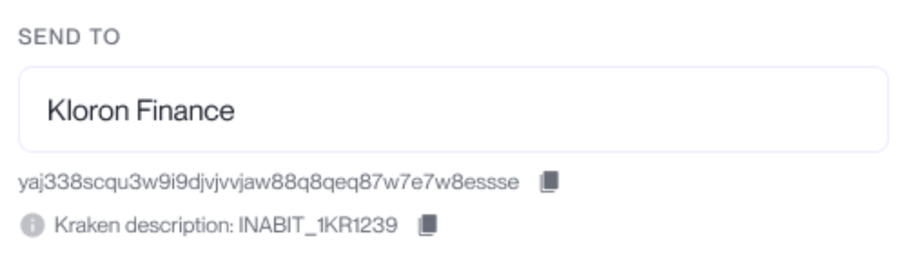
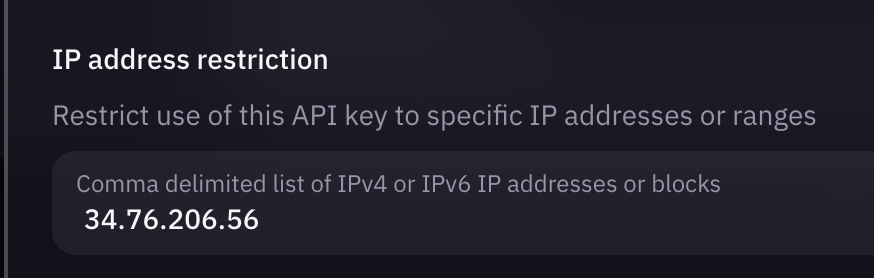
{
"data": {
"organization": {
"id": "cloh4qk1e0002dn01v9u2rfvh"
},
"name": "NEW Asher QA",
"contactCategory": {
"id": "cllurziwt006xgqjllg9x5grm"
}
},
"where": {
"id": "clph5roj900138f01ngzdkzdm"
}
}{
"data": {
"updateContact": {
"id": "clph5roj900138f01ngzdkzdm",
"name": "NEW Asher QA",
"contactCategory": {
"id": "cllurziwt006xgqjllg9x5grm",
"name": "Marketing",
},
"firstName": "Asher",
"lastName": "Indursky",
"fullName": "Asher Indursky",
"email": "[email protected]",
"shouldNotifyTx": true,
"phone": "588080080",
"phoneCountry": {
"id": "cli023gmw005vlczi6pl7ck0w",
"phoneCode": "+972",
},
}
}
}
query User($where: UserWhereUniqueInput!) {
  user(where: $where) {
    fullName
    organizations {
      name
      id
    }
  }
}mutation CreateContact($data: ContactCreateInput!) {
createContact(data: $data) {
id
name
firstName
lastName
email
shouldNotifyTx
phone
contactCategory {
name
}
contactCryptoAccounts {
name
address
}
}
}
}

Received (Deposits)
Sent (Withdrawals)
Content-Type
application/json
Authorization
Bearer <token>
id*
string
ID of the organization in inabit
url*
string
URL for the webhook service to send notifications towards
id*
string
ID of the organization in inabit
Content-Type
application/json
Authorization
Bearer <token>
id*
string
Subscription ID
mutation CreateSubscription($data: SubscriptionCreateInput!) {
  createSubscription(data: $data) {
  id,
  token
  }
}{
"data": {
"organization": {
"id": "clu1dzpny0007vjto1gxhl5my" # inabit organization Id
},
"url": "https://studio.apollographql.com", # Webhook for subscriber
}
}{
"data": {
"createSubscription": {
"id": "clugv892y0000vjhga8ugol38", # Created subscription Id
"token": "sub_c028ef8d-b8b9-49c0-b5a9-f7451884b834" # Unique generated token recognized by inabit
}
}
}{
"errors": [
{
"message": "INTERNAL_SERVER_ERROR",
"locations": [
{
"line": 2,
"column": 3
}
],
"path": [
"createSubscription"
],
"extensions": {
"code": "INTERNAL_SERVER_ERROR",
"message": "There's already an active subscription for this organization. (organization: clu1dzpny0007vjto1gxhl5my)",
"exception": {
"message": "INTERNAL_SERVER_ERROR",
"stacktrace": [
"Error: There's already an active subscription for this organization. (organization: clu1dzpny0007vjto1gxhl5my)",
" at SubscriptionResolver.createSubscription (C:\\Users\\Ori Botan\\Documents\\inabit\\inabit\\server\\src\\subscription\\subscription.resolver.ts:81:13)"
]
}
}
}
],
"data": null
}{
"errors": [
{
"message": "INTERNAL_SERVER_ERROR",
"locations": [
{
"line": 2,
"column": 3
}
],
"path": [
"createSubscription"
],
"extensions": {
"code": "INTERNAL_SERVER_ERROR",
"message": "Create subscription failed (organization: clu1dzpny0007vjto1gxhl5my)",
"exception": {
"message": "INTERNAL_SERVER_ERROR",
"stacktrace": [
"Error: Create subscription failed (organization: clu1dzpny0007vjto1gxhl5my)",
" at SubscriptionResolver.createSubscription (C:\\Users\\Ori Botan\\Documents\\inabit\\inabit\\server\\src\\subscription\\subscription.resolver.ts:81:13)"
]
}
}
}
],
"data": null
}query Subscriptions($where: SubscriptionWhereInput) {
subscriptions(where: $where) {
id
token
}
}mutation DeleteSubscription($where: SubscriptionWhereUniqueInput!) {
deleteSubscription(where: $where) {
id
}
}body:
{
"where": {
"id": "clu5bxctk0003vje4n4pqfdya" # Subscription Id
}
}{
"data": {
"deleteSubscription": {
"id": "clugwvbm70007vj4w74gxch3u"
}
}
}{
"errors": [
{
"message": "INTERNAL_SERVER_ERROR",
"locations": [
{
"line": 2,
"column": 3
}
],
"path": [
"deletesubscription"
],
"extensions": {
"code": "INTERNAL_SERVER_ERROR",
"message": "Delete subscription failed (organization: clu1dzpny0007vjto1gxhl5my)",
"exception": {
"message": "INTERNAL_SERVER_ERROR",
"stacktrace": [
"Error: Delete subscription failed (organization: clu1dzpny0007vjto1gxhl5my)",
" at SubscriptionResolver.deleteSubscription (C:\\Users\\Ori Botan\\Documents\\inabit\\inabit\\server\\src\\subscription\\subscription.resolver.ts:81:13)"
]
}
}
}
],
"data": null
}String
Contact Email
shouldNotifyTx
Boolean
If true, send emails to this contact
for every transaction associated
with the contact's addresses
("walletCryptoAccounts")
phone
String
Phone Number
contactCategory name
String
Category name from "Categories"
contactCryptoAccounts*
String
Name + address per wallet
address (contactCryptoAccounts)
String
Address of the created contactCryptoAccount
Content-Type
application/json
Authorization
Bearer <token>
oraganizationId*
String
Organization ID
contactName*
String
Contact Name
firstName
String
Contact's First Name
lastName
String
Contact's Last Name
id
String
Contact ID
name
String
Contact Name
id (contactCryptoAccounts)
String
ID of the created contactCryptoAccount
name (contactCryptoAccounts)
String
Name of the created contactCryptoAccount
Content-Type
application/json
Authorization
Bearer <token>
id*
String
Transaction ID
Example body:
Return values:
id
String
Transaction ID
amount
String
Transaction Amount (in cryptocurrency)
name (blockchain)
String
Blockchain Name
code (blockchain)
String
Blockchain Code
How do I retrieve my transaction ID?
In order to retrieve a transaction's identifier, you'll need to query all of an organization's transactions first, and fetch the specific transaction ID.
Example body:
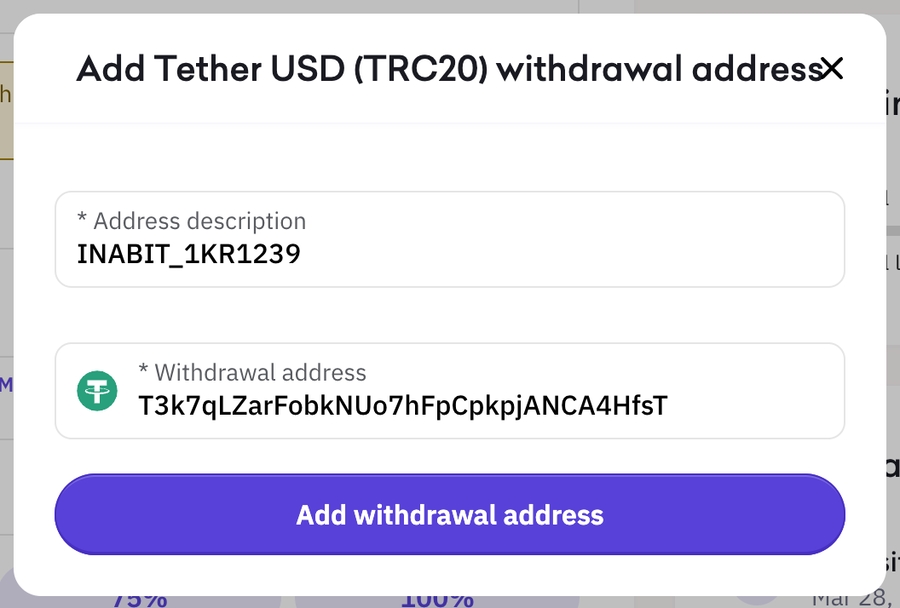
{
  "data": {
    "organization": {
      "id": "cloh4qk1e0002dn01v9u2rfvc"
    },
    "name": "George Johnson Limited",
    "firstName": "George",
    "lastName": "Johnson",
    "email": "[email protected]",
    "shouldNotifyTx": true,
    "phone": "588080080",
    },
    "contactCategory": {
      "name": "FinancialServices"
    },
    "contactCryptoAccounts": {
      "create": [
        {
          "name": "Contact address TRON",
          "address": "TBNVRZWdb3ofKeEjucKMCdnnRUbmbdmL8H"
        },
        {
          "name": "Contact address ETH",
          "address": "0xeee9db769958a4b75b5b771f7d196569258e114b"
        }
      ]
    }
  }
}{
"data": {
"createContact": {
"id": "clph5roj900138f01ngzdkzdm",
"name": "George Johnson Limited",
"contactCryptoAccounts": [
{
"id": "clph5roj900148f010tomaef4",
"name": "Contact address TRON",
"address": "TBNVRZWdb3ofKeEjucKMCdnnRUbmbdmL8H",
},
{
"id": "clph5roj900158f01ssdlpu7e",
"name": "Contact address ETH",
"address": "0xeee9db769958a4b75b5b771f7d196569258e114b",
}
],
}
}
}query User($where: UserWhereUniqueInput!) {
user(where: $where) {
fullName
organizations {
name
id
}
}
}{
"data": {
"transaction": {
"id": "clk10q8he002kk660o1ed8ud4",
"transactionType": "Withdrawal",
"createdAt": "2023-07-13T10:39:42.963Z",
"createdBy": {
"fullName": "admin admin",
"firstName": "admin",
"lastName": "admin",
"id": "cljzumg980000k603eaitu5sq",
"profileFile": null
},
"txId": null,
"contactCryptoAccount": {
"address": "0xcce6de61f9abdb6b43effee5dd603bb7c6ee3fc6",
"name": "Binance Smart Chain d97e1c12",
"contact": {
"name": "Wesley Hermann"
}
},
"kyt": 6,
"wallet": {
"id": "cljzumgyb000ik603z04lxgyk",
"name": "REAL WALLET Wallet",
"externalId": "6422985cfa2a9b000726588b",
"organization": {
"id": "cljzumgxa0009k603wl8foc6x"
},
"organizationExchange": null
},
"financialAsset": {
"id": "clefn78h5012plc6rxbmofnop",
"code": "ETH",
"name": "Ethereum",
"precision": 8
},
"blockchain": {
"id": "clefn78cl00i3lc6rih442mx9",
"name": "Ethereum",
"code": "ethereum",
"contractType": "ERC20",
"networkScannerUrl": "https://etherscan.io/tx/"
},
"amount": 0.5,
"rateEUR": null,
"rateUSD": null,
"status": {
"category": "InProgress",
"status": "Processing",
"exchangeStatuses": [],
"transactionSubStatuses": [
{
"subStatus": "WaitingExecution"
},
{
"subStatus": "InExecution"
}
]
},
"fee": null,
"note": "",
"swapAssetTo": null,
"swapToAmount": null,
"metaData": [
{
"value": "0.5",
"transactionMetaDataField": {
"id": "zb88n54ipqwjspo1wyw35nf5",
"name": "requestedAmount"
}
}
]
}
}
}query Transaction($where: TransactionWhereUniqueInput!) {
transaction(where: $where) {
id
amount
blockchain {
name
code
}
createdAt
createdBy {
fullName
}
fee
note
status {
status
}
wallet {
name
id
}
financialAsset {
code
}
isAccelerated
priority
rateUSD
rateEUR
kyt
}
}{
"where": {
"id": "clllyfhdj00w9btqke47wsesx"
}
}query Transactions($where: TransactionWhereInput) {
transactions(where: $where) {
id
}
}{
"where": {
"wallet": {
"organization": {
"id": ""
}
}
}
}createdAt
Datetime
Creation Time
fullName (createdBy)
String
Full Name of Initiator
fee
Integer
Transaction Fee
note
String
Transaction Note
status
String
Transaction Status
name (wallet)
String
Wallet Name
id (wallet)
String
Wallet ID
code (financialAsset)
String
FinancialAsset Code (i.e - "ETH" / "BTC")
isAccelerated
Boolean
Flag that indicates wether the transaction is accelerated. (true/false)
priority
String
Transaction Priority (Slow, Medium, Fast, etc.)
rateUSD
Integer
Asset Rate at the time of the Transaction (in USD)
rateEUR
Integer
Asset Rate at the time of the Transaction (in Euro)
kyt
String
KYT (Know-Your-Transaction) risk score. 0 - Worst score 10 - Best Score


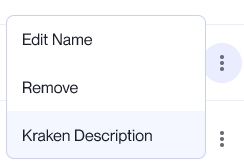
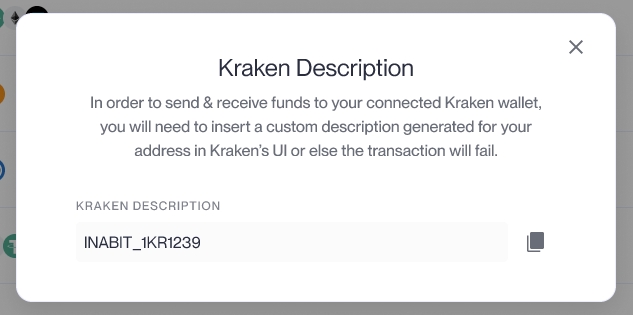
Fetching an existing coin/asset blockchain address within a wallet
The CreateContactCryptoAccount mutation allows API users to save an un-recognized address to the contact's whitelist. This action essentially means that you can name an address while labeling it to an existing contact in the organization.
The contact must exist first, in order to create a new contact, follow the steps in the Create New Contact page..
Example body:
Return values:
In the query's response, you will receive the created API wallet address for the wallet, asset & blockchain IDs given in the body.
mutation CreateContactCryptoAccount($data: ContactCryptoAccountCreateInput!) {
  createContactCryptoAccount(data: $data) {
    address
    name
    contact {
      id
      name
    }
    id
  }
}
Content-Type
application/json
Authorization
Bearer <token>
address*
string
Address to be saved
contactName*
string
Existing contact's name
name*
string
Address name
organizationId
string
Organization ID
address
String
API Wallet Address
{
  "data": {
    "address": "0x39be337b9c1e91182d9c2c0e63233e9f2db4d9dc",
    "contactName": "Example Tests",
    "name": "Test address",
    "organizationId": "clllyfclz0007btqk0iigw1n1"
  }
}{
"data": {
"createContactCryptoAccount": {
"address": "0x39be337b9c1e91182d9c2c0e63233e9f2db4d9dd",
"name": "Test address name",
"contact": {
"id": "clvmgp4h1002j88014aw1k6uf",
"name": "Test Contact"
},
"id": "clvmgp4h1002h8801lx7oyycg"
}
}
}{
"error": "Invalid request"
}